VB 中如何为Toolbar 按钮添加图片?
1、在窗体加toolbar 和 ImageList 控件
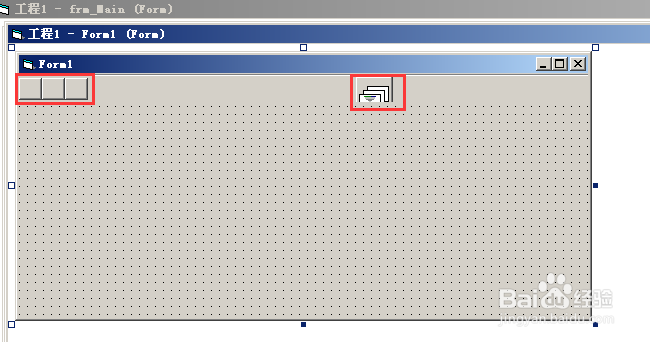
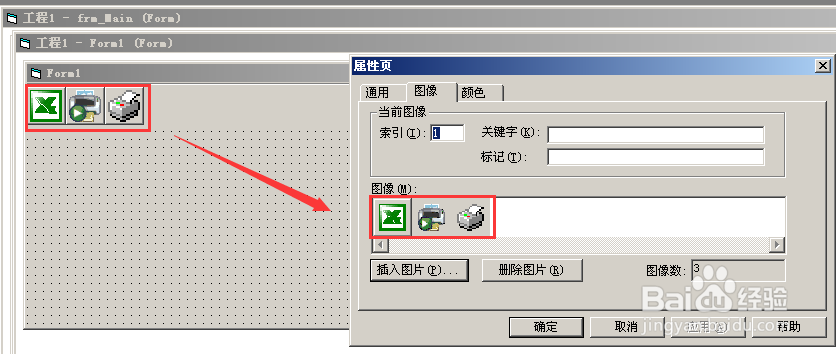
2、右击 ImageList 控件 点属性→图像→插入图片

3、右击toolbar 控件 点属性→通用→像列表,选择 ImageList
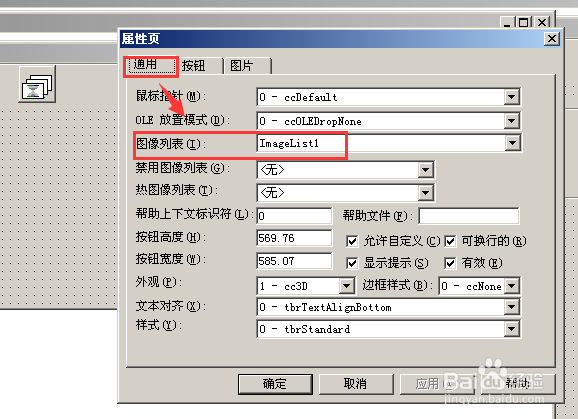
4、toolbar 控件 属性→按钮 ,图像处输入ImageList 图像索引
5、按钮添加图像完成
阅读量:20
阅读量:137
阅读量:178
阅读量:184
阅读量:32
1、在窗体加toolbar 和 ImageList 控件
2、右击 ImageList 控件 点属性→图像→插入图片
3、右击toolbar 控件 点属性→通用→像列表,选择 ImageList
4、toolbar 控件 属性→按钮 ,图像处输入ImageList 图像索引
5、按钮添加图像完成