如何设置icofx软件导出到图像时导出透明度信息
1、点击“icofx”

2、在弹出窗口中,点击“Options”
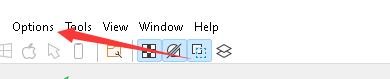
3、在弹出下拉栏中,点击“Preferences”

4、在弹出窗口中,点击“Options”

5、在弹出窗口中,将“Export transparency information when exporting to image”勾选上

6、点击“OK”即可

阅读量:150
阅读量:139
阅读量:73
阅读量:104
阅读量:44
1、点击“icofx”
2、在弹出窗口中,点击“Options”
3、在弹出下拉栏中,点击“Preferences”
4、在弹出窗口中,点击“Options”
5、在弹出窗口中,将“Export transparency information when exporting to image”勾选上
6、点击“OK”即可